Geomechanics.io

  • Free Tools
Sign UpLog In

Geomechanics.io

Geomechanics, Streamlined.

© 2026 Geomechanics.io. All rights reserved.

Geomechanics.io

CMRR-ioGEODB-ioHYDROGEO-ioQCDB-ioFree Tools & CalculatorsBlogLatest Industry News

Industries

MiningConstructionTunnelling

Company

Terms of UsePrivacy PolicyLinkedIn
    Projects
    Product

    GeoDin Ground for Civil 3D: subsurface modelling in practice for designers

    July 1, 2026|

    Reviewed by Tom Sullivan

    GeoDin Ground for Civil 3D: subsurface modelling in practice for designers

    First reported on Geoengineer.org – News

    30 Second Briefing

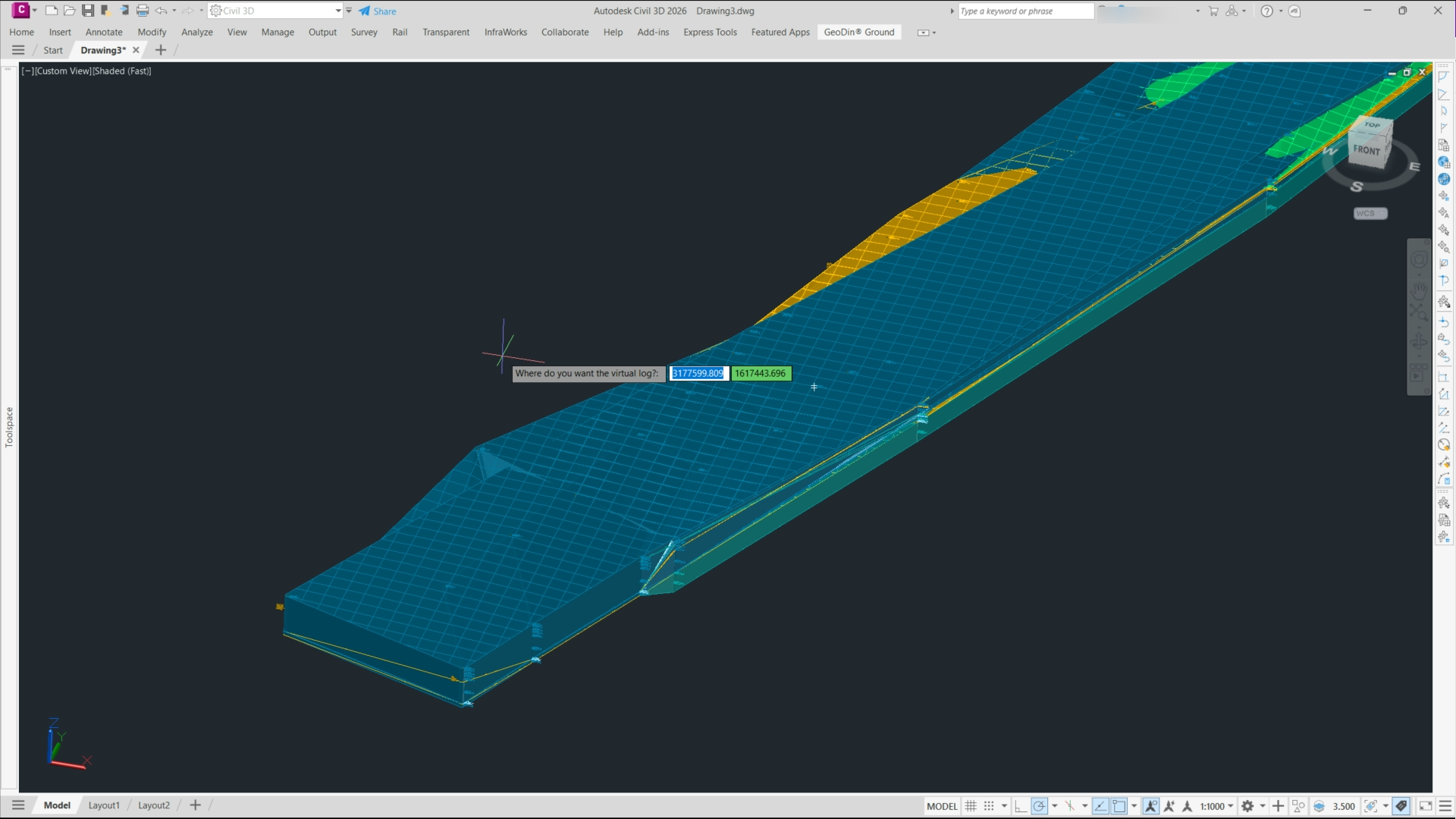
    GeoDin Ground, a free Autodesk Civil 3D plug-in, replaces manual borehole imports by directly linking Civil 3D models to GeoDin® geotechnical databases and AGS/Excel borehole logs. The tool generates dynamic 3D subsurface models, including stratigraphy, groundwater levels and geotechnical layers, that update automatically as borehole data change. For designers, this means borehole positions, interpreted soil horizons and material properties are embedded in corridors, alignments and earthworks, reducing data re-entry and improving consistency between geotechnical interpretation and Civil 3D design.

    Technical Brief

    • GeoDin Ground reads native GeoDin® projects plus AGS and Excel files without intermediate conversion steps.
    • Borehole filters allow selection by chainage, offset, depth range or project phase before importing to Civil 3D.
    • Users can define custom lithology groupings and engineering units so Civil 3D layers match office standards.
    • The plug‑in supports multiple alignments and corridors in one drawing, each linked to the same geodata source.
    • Data exchange is two‑way: edited borehole coordinates in Civil 3D can be written back to the GeoDin project.
    • Civil 3D surfaces and solids generated from the model can be used directly in volume, cut/fill and clash checks.

    Our Take

    Autodesk’s role in the RICS-led CLEAR coalition on whole-life carbon reporting suggests that tighter integration of GeoDin subsurface models into Civil 3D could eventually feed directly into embodied carbon and groundworks emissions calculations for infrastructure schemes.

    In our database, Autodesk’s recent software coverage has focused on connected construction gains (faster delivery, fewer RFIs), so embedding GeoDin Ground data into design workflows is likely aimed at extending those efficiency gains into geotechnical coordination and reducing late-stage ground-related change orders.

    Geotechnical Software for Modern Teams

    Centralise site data, logs, and lab results with GEODB-io, CMRR-io, and HYDROGEO-io.

    No credit card required.

    • Save and export unlimited calculations
    • Advanced data visualisation
    • Generate professional PDF reports
    • Cloud storage for all your projects

    Prepared by collating external sources, AI-assisted tools, and Geomechanics.io’s proprietary mining database, then reviewed for technical accuracy & edited by our geotechnical team.

    Related Articles

    Hengjaya nickel mine adopts CCLAS: assay data control and grade insights for engineers
    Software
    about 17 hours ago

    Hengjaya nickel mine adopts CCLAS: assay data control and grade insights for engineers

    PT Hengjaya Mineralindo has deployed Datamine’s CCLAS laboratory information management system at its Hengjaya open-pit laterite nickel mine in Morowali, Central Sulawesi, to tighten control of saprolite and limonite assay data. The system centralises sample tracking, results validation and reporting across the nickel laboratory workflow, reducing manual data entry and the risk of transcription errors. More reliable, time-stamped laboratory data supports tighter grade control, reconciliation and ore blending decisions for the Nickel Industries Limited subsidiary.

    Future Homes carbon assessment v3: infrastructure scope explained for engineers
    Software
    8 days ago

    Future Homes carbon assessment v3: infrastructure scope explained for engineers

    Future Homes Hub has released version 3 of its Whole Life Carbon Assessment tool for new homes, aligned with the RICS Whole Life Carbon Assessment Professional Standard (2nd edition) and incorporating sector-specific defaults, assumptions and methodologies. The 2026 update extends the Conventions to cover site infrastructure, adding standard scopes for site preparation, estate roads, utilities and off-plot works that were previously a “data black hole”. For developers and civil engineers, this enables more comprehensive, comparable embodied carbon reporting across multi-site housing schemes and clearer allocation of infrastructure emissions.

    John Deere Electronics Vision Processing Unit: autonomy design notes for engineers
    Software
    12 days ago

    John Deere Electronics Vision Processing Unit: autonomy design notes for engineers

    John Deere Electronics is releasing its field-tested Vision Processing Unit (VPU) to European OEMs and machine builders, enabling integration of ruggedised, vision-based autonomy hardware into next-generation mobile machinery. The VPU is designed to run high-compute computer vision and machine learning workloads for real-time perception and decision-making, such as object detection, obstacle avoidance and path planning around mining and construction equipment. For engineers, this offers an off‑the‑shelf, validated compute platform for autonomous or operator-assist systems without developing bespoke edge hardware.

    Related Industries & Products

    Construction

    Quality control software for construction companies with material testing, batch tracking, and compliance management.

    Mining

    Geotechnical software solutions for mining operations including CMRR analysis, hydrogeological testing, and data management.

    QCDB-io

    Comprehensive quality control database for manufacturing, tunnelling, and civil construction with UCS testing, PSD analysis, and grout mix design management.

    AllGeotechnicalInfrastructureHazardsEnvironmental